
Everyday AI · Safety & Security
Check a suspicious courier or smishing message
Did you get a courier or SMS message that asks for a fee, a click, or personal details and want a careful red-flag check?
Listen to this guide
AI narration · English · Prompt text stays on the page
Try ElevenLabs ↗ · Affiliate link
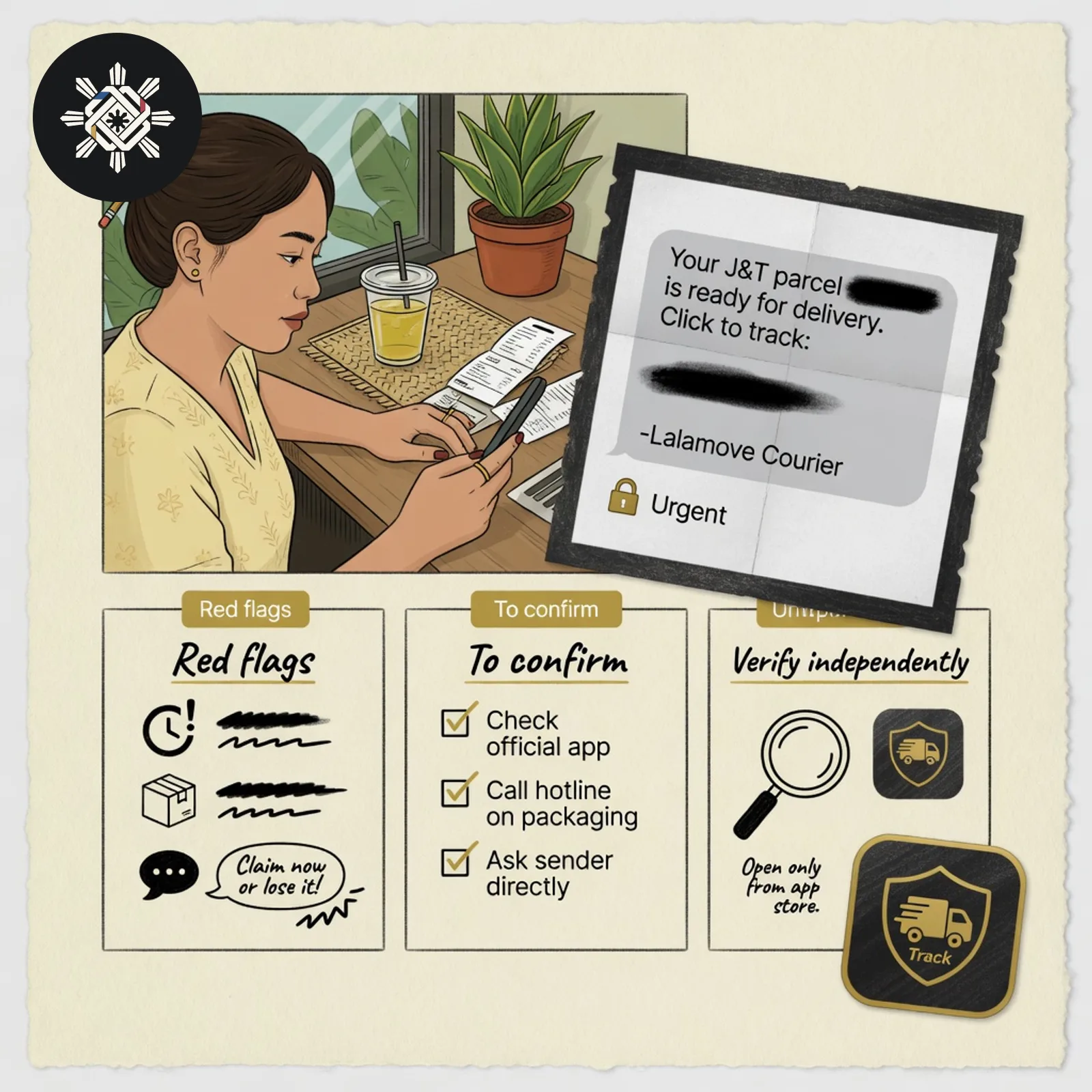
What you will make
An evidence-limited red-flag sheet and safe independent verification steps. Absence of an obvious red flag is never treated as proof the message is safe.
What you need
The pasted SMS text, or a screenshot with phone numbers, names, addresses, tracking numbers, and QR codes already hidden.
Before you start
Do not tap the link, call the number in the message, or reply. Hide identifiers before you upload a screenshot.
What to do
- Do not tap, call, or reply from the suspicious message.
- Copy the text, or redact a screenshot before any upload.
- Paste the prompt so the AI lists only red flags that are actually present.
- Open the company's known official app or website yourself, using a bookmark or app store search — not the message link.
- Follow current official report or block guidance from your telco or the authorities when that fits.
Try this prompt
Never ask the AI to open or shorten the suspicious link.
Assess this suspicious courier/SMS message using only the text or REDACTED screenshot I provide. Identify observable warning signs and give safe independent verification steps — do not declare the message genuine.

BEFORE ANALYSIS
If the screenshot/text contains unnecessary personal identifiers, tracking/order details, financial details, authentication codes, QR/barcodes, or other sensitive data, tell me what to redact. Do not repeat exposed secrets or sensitive numbers.

SAFETY RULES
- Do not open, follow, shorten, reconstruct, normalize, decode, or recommend clicking any URL/QR code from the message.
- Do not recommend calling or replying to contact details contained in the suspicious message.
- Do not recommend paying, downloading/installing anything, or entering credentials through the message.
- Never label it “safe” merely because no obvious warning sign is visible.
- Do not invent sender/domain information that is cut off or unreadable.

OUTPUT
1. What the message explicitly claims — supplied content only.
2. Red flags actually present, with the exact clue supporting each one.
3. Unknown / “To confirm” items.
4. Risk triage: few visible warning signs / suspicious / high-risk indicators — evidence-based triage, not proof of authenticity.
5. Safe verification steps beginning from the company/courier’s independently reached official app/site/contact.
6. Short “Do not do” list.
7. If I already clicked, entered information, paid, or installed something, ask only what category of action occurred and give appropriate official recovery direction without requesting sensitive credentials.

Focus on observable clues such as pressure/urgency, unexpected fees, credential requests, sender/domain mismatch, shortened/look-alike links and unusual payment instructions — but list a clue only when actually visible.

End with: “AI can flag clues; verify through an independently reached official channel before acting.”See a sample result
Illustrative example. Your answer may differ.
Input (illustrative): "Your package is on hold. Pay ₱17.50 today at sample-lookalike-site.example to release delivery." Example result: Red flags listed — urgency, unexpected fee, look-alike payment domain. Facts stated — package hold claim and ₱17.50 fee. Order status remains To confirm. Do-not list — no click, no pay, no OTP. Verify in the courier's official app opened independently.
Before you use it: Verify the shipment only inside the official app or site you opened yourself. Never enter an OTP or pay from the suspicious message. AI flags clues; official channels decide.
Try this follow-up
Rewrite the safe verification steps shorter. Keep every red flag tied only to text that actually appears.
If the answer is not right
If the draft says the message is safe, or tells me to open the link to check it, delete that advice and ask for independent verification only.
Philippine notes
- Before treating any report number or telco steps as current, open the authority or provider's own page. Guidance changes.
- Related safety lessons cover fake WFH offers and deepfake scams; this one is for courier/SMS smishing.
More everyday guides
 Did you receive an unsolicited online job offer or work-from-home task and wonder if it is a scam?
 Did you receive a suspicious video, voice note, or emergency money request that seems real?
 Did you see a GCash or Maya transaction you did not authorize and need a clear timeline and support message?
 Did a load or sale text arrive, and you want the price and the limit written out?